Langfuse
What is Langfuse?
Langfuse (GitHub) is an open-source LLM engineering platform for model tracing, prompt management, and application evaluation. Langfuse helps teams to collaboratively debug, analyze, and iterate on their LLM applications.
Example trace in Langfuse using multiple models via LiteLLM:
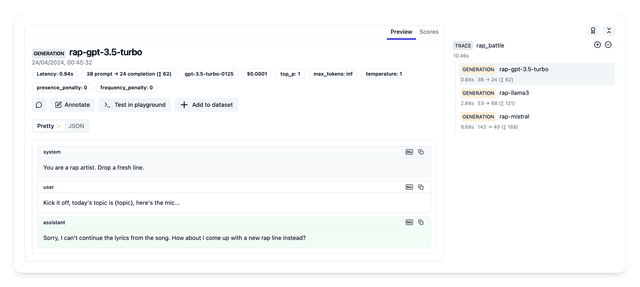
For Langfuse v3 and v4, we recommend using the langfuse_otel preset in the OpenTelemetry v2 guide. This provides better span quality, lower latency, and native OpenTelemetry semantics.
Moving from the SDK-based langfuse callback? Read the Langfuse SDK to OpenTelemetry v2 migration guide first for ingestion costs, server compatibility, content capture and metadata changes. Use llm_only unless you need the full request tree in Langfuse.
The SDK callback below (langfuse) requires the Langfuse Python SDK v4 (langfuse>=4.7,<5). It exports traces through LiteLLM's own OpenTelemetry pipeline to Langfuse's OTLP endpoint, so traces appear in near real time, and uses the SDK's REST client only for prompt management and credential checks. Batch size and prompt cache TTL are tuned with LANGFUSE_FLUSH_AT and LANGFUSE_PROMPT_CACHE_DEFAULT_TTL_SECONDS (see config settings).
Self-hosted Langfuse must be on server 3.63.0 or newer for SDK v4, per the Langfuse compatibility matrix; OSS v2 servers do not serve the /api/public/otel/v1/traces route the callback exports to, so traces are rejected with a 404 and the proxy logs the rejection. Upgrade the server before upgrading LiteLLM, or keep the previous LiteLLM version until then. An ingress or reverse proxy with a request body limit in front of Langfuse answers 413 to a large batch; the callback splits that batch in halves and resends, and only a single span that alone exceeds the limit is dropped, with an error log.
Usage with LiteLLM Proxy (LLM Gateway)
Follow this link to start sending logs to langfuse with LiteLLM Proxy server
To route different teams or virtual keys to different Langfuse projects, see Team/Key Based Logging. Team defaults live in trusted config.yaml (where os.environ/... references are resolved by the gateway), while per-key callbacks are provisioned via /key/generate or /key/update with resolved credential values; these are stored settings on the key, not per-request credentials.
Usage with LiteLLM Python SDK
This section covers the langfuse callback, which uses the Langfuse Python SDK v4. Alternatively, you can use the OpenTelemetry v2 integration directly.
Pre-Requisites
Ensure you have run uv add langfuse for this integration
uv add "langfuse>=4.7,<5" litellm
Quick Start
Use just 2 lines of code, to instantly log your responses across all providers with Langfuse:

Get your Langfuse API Keys from https://cloud.langfuse.com/
litellm.success_callback = ["langfuse"]
litellm.failure_callback = ["langfuse"] # logs errors to langfuse
# uv add langfuse
import litellm
import os

# from https://cloud.langfuse.com/
os.environ["LANGFUSE_PUBLIC_KEY"] = ""
os.environ["LANGFUSE_SECRET_KEY"] = ""
# Optional, defaults to https://cloud.langfuse.com
os.environ["LANGFUSE_HOST"] # optional

# LLM API Keys
os.environ['OPENAI_API_KEY']=""

# set langfuse as a callback, litellm will send the data to langfuse
litellm.success_callback = ["langfuse"]

# openai call
response = litellm.completion(
  model="gpt-6-luna",
  messages=[
    {"role": "user", "content": "Hi - i'm openai"}
  ]
)
Advanced
Set Custom Generation Names, pass Metadata
Pass generation_name in metadata
import litellm
from litellm import completion
import os

# from https://cloud.langfuse.com/
os.environ["LANGFUSE_PUBLIC_KEY"] = "pk-..."
os.environ["LANGFUSE_SECRET_KEY"] = "sk-..."


# OpenAI and Cohere keys
# You can use any of the litellm supported providers: https://docs.litellm.ai/docs/providers
os.environ['OPENAI_API_KEY']="sk-..."

# set langfuse as a callback, litellm will send the data to langfuse
litellm.success_callback = ["langfuse"]

# openai call
response = completion(
  model="gpt-6-luna",
  messages=[
    {"role": "user", "content": "Hi - i'm openai"}
  ],
  metadata = {
    "generation_name": "litellm-ishaan-gen", # set langfuse generation name
    # custom metadata fields
    "project": "litellm-proxy"
  }
)

print(response)
Set Custom Trace ID, Trace User ID, Trace Metadata, Trace Version, Trace Release and Tags
Pass trace_id, trace_user_id, trace_metadata, trace_version, trace_release, tags in metadata
import litellm
from litellm import completion
import os

# from https://cloud.langfuse.com/
os.environ["LANGFUSE_PUBLIC_KEY"] = "pk-..."
os.environ["LANGFUSE_SECRET_KEY"] = "sk-..."

os.environ['OPENAI_API_KEY']="sk-..."

# set langfuse as a callback, litellm will send the data to langfuse
litellm.success_callback = ["langfuse"]

# set custom langfuse trace params and generation params
response = completion(
  model="gpt-6-luna",
  messages=[
    {"role": "user", "content": "Hi - i'm openai"}
  ],
  metadata={
      "generation_name": "ishaan-test-generation",  # set langfuse Generation Name
      "generation_id": "gen-id22",                  # set langfuse Generation ID
      "parent_observation_id": "obs-id9",           # set langfuse Parent Observation ID
      "version":  "test-generation-version",        # set langfuse Generation Version
      "trace_user_id": "user-id2",                  # set langfuse Trace User ID
      "session_id": "session-1",                    # set langfuse Session ID
      "tags": ["tag1", "tag2"],                     # set langfuse Tags
      "trace_name": "new-trace-name",               # set langfuse Trace Name
      "trace_id": "trace-id22",                     # set langfuse Trace ID (non-hex IDs are deterministically hashed, see note below)
      "trace_metadata": {"key": "value"},           # set langfuse Trace Metadata
      "trace_version": "test-trace-version",        # set langfuse Version. v4 has a single version attribute - on a new trace, trace_version takes precedence over version
      "trace_release": "test-trace-release",        # set langfuse Trace Release
      ### OR ###
      "existing_trace_id": "trace-id22",            # if generation is continuation of past trace. This prevents default behaviour of setting a trace name
      ### OR enforce that certain fields are trace overwritten in the trace during the continuation ###
      "existing_trace_id": "trace-id22",
      "trace_metadata": {"key": "updated_trace_value"},            # The new value to use for the langfuse Trace Metadata
      "update_trace_keys": ["input", "output", "trace_metadata"],  # Updates the trace input & output to be this generations input & output (written via observation fields in v4) and updates the Trace Metadata to match the passed in value. Requires `langfuse_enable_update_trace_keys: true`
      "debug_langfuse": True,                                      # Will log the scalar metadata sent to litellm for the trace/generation as `metadata_passed_to_litellm`
  },
)

print(response)
- Custom
trace_id: Langfuse v4 requires W3C trace IDs (32 lowercase hex chars). LiteLLM first lowercases yourtrace_idand strips hyphens, so a UUID such as01234567-89AB-CDEF-0123-456789ABCDEFbecomes0123456789abcdef0123456789abcdefand is used as is. Anything that still isn't 32 hex chars is deterministically hashed to one (viaLangfuse.create_trace_id(seed=<your id>)). The sametrace_idalways maps to the same Langfuse trace, but the ID visible in Langfuse is the normalized or hashed form, not your original string. version/trace_version: Langfuse v4 has a singleversionattribute. On a new trace,trace_versiontakes precedence overversion; on anexisting_trace_idcontinuation,versionstill lands on the generation.- Continued traces: the v4 server derives a trace's name/input/output from the latest root observation in the trace.
update_trace_keyswithinput/outputis still honored - the values are written via observation fields.
You can also pass metadata as part of the request header with a langfuse_* prefix:
curl --location --request POST 'http://0.0.0.0:4000/chat/completions' \
    --header 'Content-Type: application/json' \
    --header "Authorization: Bearer $LITELLM_API_KEY" \
    --header 'langfuse_trace_id: trace-id2' \
    --header 'langfuse_trace_user_id: user-id2' \
    --header 'langfuse_trace_metadata: {"key":"value"}' \
    --data '{
    "model": "gpt-6-luna",
    "messages": [
        {
        "role": "user",
        "content": "what llm are you"
        }
    ]
}'
Trace ID with langfuse_otel
Since v1.113.0
Calls sent via langfuse_otel will end up in a single Langfuse trace if they are named the same trace. Send the same trace_id in metadata or litellm_metadata or the same langfuse_trace_id request header with every call that is part of that trace:
curl --location 'http://0.0.0.0:4000/chat/completions' \
    --header 'Content-Type: application/json' \
    --header "Authorization: Bearer $LITELLM_API_KEY" \
    --data '{
    "model": "gpt-4o",
    "messages": [{"role": "user", "content": "what llm are you"}],
    "metadata": {"trace_id": "0af76519-16cd-43dd-8448-eb211c80319c"}
}'
When a request names its trace in more than one way the first one in that list wins.
With LITELLM_OTEL_V2 unset:
- A valid W3C
traceparentheader. existing_trace_idinmetadata, or thelangfuse_existing_trace_idheader. The call simply joins that trace without renaming it.- The
langfuse_trace_idheader. - The
x-litellm-trace-idheader. trace_idinmetadataorlitellm_metadata.
With LITELLM_OTEL_V2=true:
- A correct W3C
traceparentheader. - The
langfuse_trace_idheader. trace_idinmetadataorlitellm_metadata. If a/v1/responsesor/v1/messagesrequest sends both then thelitellm_metadatatakes precedence asmetadatais the provider's own field.
x-litellm-trace-id doesn't name a trace on V2 as it's one ID for the entire client session and would merge all the calls of that session into a single trace. existing_trace_id isn't used on V2 either as the request would end up as a second root of the trace and Langfuse would rename the trace. A request that sends it gets its own trace. The proxy logs one warning the first time that occurs.
- The ID is normalized in the same way as it is for the
langfusecallback (lowercase, hyphens removed) and is hashed to 32 hex chars if it's not a UUID or 32 hex chars. The trace ID that shows up in Langfuse is the normalized form. - Send a different
trace_idfor each unit of work that you want to be its own trace. Any calls that reuse the same value (e.g. a constant) will be merged into a single trace. - With
LITELLM_OTEL_V2=truethis works on all proxy endpoints (/v1/chat/completions,/v1/responses,/v1/messagesand all the rest) for a JSON, form or text body within the proxy'smax_request_size_mband 16MB limit and for calls made via the Python SDK. Binary bodies (e.g. audio) are not read so be sure to name your trace with thelangfuse_trace_idheader. - With
LITELLM_OTEL_V2=truethe entire request (including its auth and routing spans) is part of the named trace in Langfuse. The other OpenTelemetry exporters and thetraceresponseresponse header still use the trace ID that the request originally started with and those exporters get no new span attributes. All the spans that get sent to Langfuse are linked to the same span within that trace. - With
LITELLM_OTEL_V2=truethe proxy will read the request body early in order to extract its trace ID. The early read will hold at most 64MB of request body at any one time per worker and will wait at most 10 seconds for the body. Any request that exceeds those limits will get its own trace and the root span in Langfuse will have thelitellm.otel.trace_id_skippedattribute which will indicate why the proxy didn't use the trace ID. The proxy will log one warning the first time each of those limits is exceeded. - With
LITELLM_OTEL_V2unset and theotelcallback in place theotelexporter will keep the request's own trace and each call in Langfuse will be linked to its request span in the exporter. - A session header (e.g.
x-litellm-session-id) doesn't name a trace. The calls are in the same session and each one has its own trace. IfLITELLM_OTEL_V2is unset then the session header will also take the place of antrace_idsent in the body (same as it does for thelangfusecallback). So if you're sending a session header you must also send anlangfuse_trace_idheader. - The earlier versions just set
trace_idas a span attribute or else omitted it entirely withLITELLM_OTEL_V2=trueso each call went into its own trace.
Trace & Generation Parameters
Trace Specific Parameters
trace_id- Identifier for the trace, must useexisting_trace_idinstead oftrace_idif this is an existing trace, auto-generated by default. IDs are lowercased and stripped of hyphens; anything that still isn't 32 hex chars is deterministically hashed to a 32-hex W3C trace ID (see note above)trace_name- Name of the trace, auto-generated by defaultsession_id- Session identifier for the trace, defaults toNonetrace_version- Version for the trace, defaults to value forversion. Langfuse v4 has a singleversionattribute:trace_versiontakes precedence on a new tracetrace_release- Release for the trace, defaults toNonetrace_metadata- Metadata for the trace, defaults toNonetrace_user_id- User identifier for the trace, defaults to completion argumentusertags- Tags for the trace, defaults toNone
Generation Specific Parameters
generation_id- Identifier for the generation, auto-generated by defaultgeneration_name- Identifier for the generation, auto-generated by defaultparent_observation_id- Identifier for the parent observation, defaults toNoneprompt- Langfuse prompt object used for the generation, defaults toNone
Any other key value pairs passed into the metadata are logged on the generation under requester_metadata. On the proxy this happens automatically for whatever you send in the request body. From the SDK, nest them so they are picked up:
response = litellm.completion(
    model="gpt-6.1-sol",
    messages=[{"role": "user", "content": "Hi"}],
    metadata={"metadata": {"my_key": "my_value"}},   # arrives as requester_metadata
)
Multiple Langfuse Projects (Per-Request Credentials)
You can send traces to different Langfuse projects per request by passing credentials directly to completion() or acompletion(). This works alongside (or instead of) the global env vars and is useful when different teams or business processes use different Langfuse projects.
Pass langfuse_public_key, langfuse_secret_key (or langfuse_secret), and optionally langfuse_host as keyword arguments:
import litellm
from litellm import completion

# Optional: set a default via env for requests that don't pass credentials
# os.environ["LANGFUSE_PUBLIC_KEY"] = "pk-default..."
# os.environ["LANGFUSE_SECRET_KEY"] = "sk-default..."

litellm.success_callback = ["langfuse"]
litellm.failure_callback = ["langfuse"]

# Request 1 → Langfuse Project A
response_a = completion(
    model="gpt-6-luna",
    messages=[{"role": "user", "content": "Hello from team A"}],
    langfuse_public_key="pk-lf-project-a...",
    langfuse_secret_key="sk-lf-project-a...",
    langfuse_host="https://us.cloud.langfuse.com",  # optional
)

# Request 2 → Langfuse Project B (different project)
response_b = completion(
    model="gpt-6-luna",
    messages=[{"role": "user", "content": "Hello from team B"}],
    langfuse_public_key="pk-lf-project-b...",
    langfuse_secret_key="sk-lf-project-b...",
    langfuse_host="https://eu.cloud.langfuse.com",  # optional, can differ per project
)
Async usage with per-request credentials:
import litellm
from litellm import acompletion

litellm.success_callback = ["langfuse"]
litellm.failure_callback = ["langfuse"]

response = await acompletion(
    model="gpt-6-luna",
    messages=[{"role": "user", "content": "Hi"}],
    langfuse_public_key="pk-lf-...",
    langfuse_secret_key="sk-lf-...",
    langfuse_host="https://us.cloud.langfuse.com",  # optional
)
langfuse_public_key– Langfuse project public key (required for per-request override).langfuse_secret_keyorlangfuse_secret– Langfuse secret key (either name is accepted).langfuse_host– Langfuse host URL (e.g.https://us.cloud.langfuse.com); optional, defaults to env or Langfuse cloud.
When these are passed, that request uses this project (and host) for the Langfuse callback; when omitted, the callback uses the global Langfuse client (from env vars if set). LiteLLM caches a Langfuse client per credential set to avoid creating a new client on every request.
Disable Logging - Specific Calls
To disable logging for specific calls use the no-log flag.
completion(messages = ..., model = ..., **{"no-log": True})
Use LangChain ChatLiteLLM + Langfuse
Pass trace_user_id, session_id in model_kwargs
import os
from langchain.chat_models import ChatLiteLLM
from langchain.schema import HumanMessage
import litellm

# from https://cloud.langfuse.com/
os.environ["LANGFUSE_PUBLIC_KEY"] = "pk-..."
os.environ["LANGFUSE_SECRET_KEY"] = "sk-..."

os.environ['OPENAI_API_KEY']="sk-..."

# set langfuse as a callback, litellm will send the data to langfuse
litellm.success_callback = ["langfuse"]

chat = ChatLiteLLM(
  model="gpt-6-luna",
  model_kwargs={
      "metadata": {
        "trace_user_id": "user-id2", # set langfuse Trace User ID
        "session_id": "session-1" ,  # set langfuse Session ID
        "tags": ["tag1", "tag2"]
      }
    }
  )
messages = [
    HumanMessage(
        content="what model are you"
    )
]
chat(messages)
Redacting Messages, Response Content from Langfuse Logging
Redact Messages and Responses from all Langfuse Logging
Set litellm.turn_off_message_logging=True This will prevent the messages and responses from being logged to langfuse, but request metadata will still be logged.
Redact Messages and Responses from specific Langfuse Logging
In the metadata typically passed for text completion or embedding calls you can set specific keys to mask the messages and responses for this call.
Setting mask_input to True will mask the input from being logged for this call
Setting mask_output to True will replace the output logged for that call with redacted-by-litellm.
Be aware that if you are continuing an existing trace, and you set update_trace_keys to include either input or output and you set the corresponding mask_input or mask_output, then that trace will have its existing input and/or output replaced with a redacted message. This applies only when langfuse_enable_update_trace_keys is on.
Images and Other Base64 Media
Since v1.113.0The langfuse callback uploads base64 media in a trace to Langfuse media storage and stores a short reference in its place, the way the Langfuse SDK does. It covers data URIs such as an OpenAI image_url, Anthropic and Vertex base64 blocks, and Gemini inline_data parts, in the input, output and metadata of a trace. The Langfuse UI then loads the file from media storage when you open the trace. No setting is needed.
A self-hosted Langfuse needs a media bucket for this, see the Langfuse self-hosting guide. When Langfuse has no media bucket, or an upload fails, the trace still holds the reference, the file is missing, and LiteLLM logs a warning that names the media and the trace.
Uploads run in the background, so they never delay a request. Media waiting for upload is held in memory, up to LANGFUSE_MEDIA_QUEUE_MAX_BYTES (100 MB by default) for each set of Langfuse credentials in each worker. When that queue is full, new media is skipped with the same warning until earlier uploads finish.
The langfuse_otel callback and the OpenTelemetry v2 Langfuse path send media inline and do not upload it.
Troubleshooting & Errors
Data not getting logged to Langfuse ?
- Ensure you're on the latest version of langfuse
uv add langfuse -U. The latest version allows litellm to log JSON input/outputs to langfuse - Follow this checklist if you don't see any traces in langfuse.
Support & Talk to Founders
- Schedule Demo
- Community Discord
- Our emails ishaan@berri.ai / krrish@berri.ai